
Explainer
128 GB or 256 GB Phone Storage? Build a Personal Storage Budget
By SpecCairn · Published October 28, 2026 · Documentation-based explanation, not a hands-on review

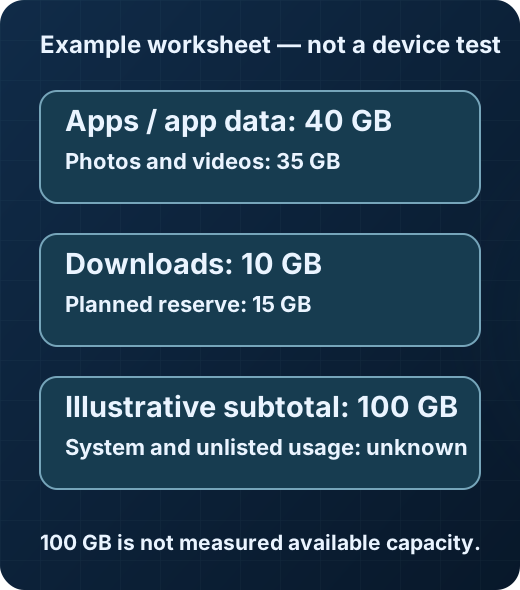
Choose between 128 GB and 256 GB by making a local-storage worksheet: current usage, planned additions, system use and a reserve. Keep a cloud-subscription quota as a separate planning entry rather than adding it to the device-capacity figure. This is a planning method, not a promise that either phone will provide its advertised capacity as free space.
Use consistent units
NIST defines 1 GB as 1,000,000,000 bytes and 1 GiB as 1,073,741,824 bytes. It also defines one byte as eight bits. Check the unit labels before comparing figures from different places.12
The worksheet below is SpecCairn’s original planning aid. Its inputs are your estimates, not values asserted by NIST or any phone maker. Look in your own phone’s storage settings for the actual usage breakdown; the menu path depends on the model and software.
Build a personal budget
| Line item | Your estimate | What to check |
|---|---|---|
| Apps and app data | Not yet entered | Current local usage and planned additions |
| Photos, videos and other local media | Not yet entered | What you want to keep on the device |
| Offline downloads and files | Not yet entered | Downloads you expect to retain |
| Operating system and system data | Not known for an unspecified model/software | The device’s own storage breakdown |
| Reserve | Your chosen allowance | Growth and items you have not yet counted |
Keep the units consistent and avoid counting the same data twice. A personal-files subtotal is not the same thing as available free space. If a category is unknown, leave it visible rather than treating it as zero.
A hypothetical example—not measured free space
Suppose your estimates are 40 GB of apps and app data, 35 GB of local photos and videos, 10 GB of downloads and 15 GB of planned reserve. SpecCairn’s illustrative arithmetic: 40 + 35 + 10 + 15 = 100 GB. Subtracting that from the nominal 128 GB label gives 28 GB.
The 28 GB is only a difference between two worksheet numbers. System use and unlisted items still need accounting for; it is not a prediction of what a real phone will show as free space. Replace these invented example inputs with your own records before making a decision.
Compare the options conditionally
Consider the smaller option only after the worksheet leaves comfortable room for your expected local use and reserve. Consider the larger option if the smaller budget is tight or too dependent on unknown entries. Neither is a universal recommendation: how often you manage local files and how much you want available offline are personal choices.
Treat cloud features as a separate question for your device and service documentation. This guide does not claim how a particular synchronization, offloading or optimization feature behaves.
Next-step checklist
- Find your current phone’s local usage breakdown and record its unit labels.
- Add expected new local data without double-counting existing usage.
- Account for system use and a personal reserve before comparing capacities.
- Keep unknown entries explicit and cloud quota separate from the local-capacity arithmetic.
- Check the exact new model’s documented storage configuration before buying.
FAQ
Should I add cloud quota to 128 GB in this worksheet?
No. Keep subscription quota and the device-capacity comparison as separate planning entries. Check the service’s actual download and offloading behavior separately.
Where do I find current usage?
Look for the storage breakdown in your phone’s settings or its manufacturer’s instructions. No universal phone menu path is verified here.
Why distinguish GB from GiB?
They name different byte counts. Use a consistent definition when comparing capacities rather than treating the labels as interchangeable.1
Scope
Model-neutral, hypothetical capacity planning. No photo-size, price, benchmark, operating-system footprint or measured free-space estimate is supplied. Arithmetic is an original illustration, not a source quotation or a manufacturer performance claim.
Scope: Model-neutral capacity planning; no verified phone menu, cloud-service behavior, OS footprint or measured free-space claim.
Sources and reference notes
- NIST: Prefixes for binary multiples. Examples and comparisons with SI prefixes. Scope: Unit definitions only; worksheet choices and arithmetic are original hypothetical planning, not NIST assertions. Source passages checked 2026-10-26; application guidance is SpecCairn’s own. Back to text
- NIST: Prefixes for binary multiples. Examples and comparisons with SI prefixes. Scope: Unit definitions only; worksheet choices and arithmetic are original hypothetical planning, not NIST assertions. Source passages checked 2026-10-26; application guidance is SpecCairn’s own. Back to text
Found an error? See the corrections process.